
This page describes the workflow that Elizabeth Mattijsen usually uses to create a Rakudo Weekly blog post. This assumes familiarity with the editor used.
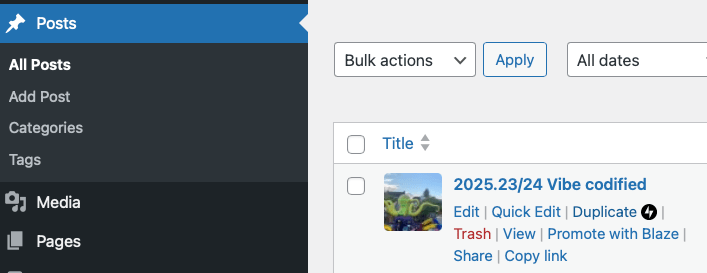
- Create a duplicate of the last weekly, start editing it and update the title by removing the title and making sure the week number is updated.
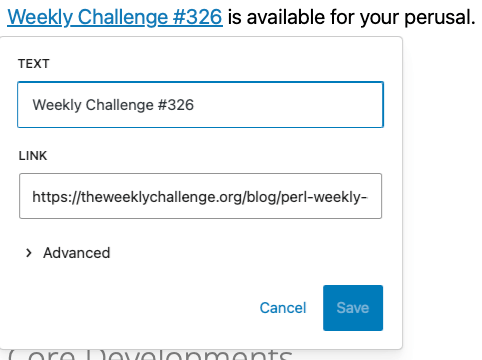
- Scroll down the Weeklies section: update the reference to the Weekly Challenge (usually just upping the number in the text and in the URL.
- Check if there are new Problem Solving issues in https://github.com/Raku/problem-solving/issues/. If there are, create / update the “New Problem Solving” issues section, and add the issue(s) there. Do not mention the author of the problem solving issue, to prevent initial bias.

The easy trick here is to right-click on the link: when you ctrl-c that, it will capture some sort of rich text that you can paste directly into the WP editor. Note that the WP editor allows you to just start a new line with “*” to make it a list entry.
- Check for new Pull Requests in:
- Add any new Pull Requests to the “New Pull Requests” section (create one if doesn’t exist yet). Do not mention the author of the problem solving issue, to prevent initial bias.
- Go down the text and put the cursor at the end of each list, then press ENTER, “a” and ENTER again. This adds a dummy entry to the list that you can later easily remove, including anything above it when you’re done. The original list can serve as inspiration, or as a source for copy/pastes, specifically of names of people. The “a” signifies that you’re not done with that part just yet.
- Open up https://raku.land/recent and check for new and updated modules. The reason I do this manually, is that the list of updates needs to be curated still. Any author updating anything in a distribution that is on the “p6c” ecosystem, will be listed, even if they do not update the version info. Also, sadly there are people (such as holyghost who publishes modules that are mere proofs of concept of an idea of a suggestion). If a module is new, add it to the “New Raku Modules” section (create one if it doesn’t exist). Otherwise add it to the “Updated Raku Modules” section.
- Check for Raku references on Bluesky https://bsky.app/search?q=%23rakulang (select “Latest” button) to see any skeets on Bluesky related to Raku. If any found, add them with an appropriate title to the “Meanwhile on Bluesky” section (add one of there isn’t one yet). Don’t bother to search for “#raku”.
- Check for Raku references on Mastodon https://mastodon.social/deck/search?q=%23rakulang&type=statuses (for #rakulang) and sadly https://mastodon.social/deck/search?q=%23raku&type=statuses (for #raku), because some people insist on using the #raku tag instead of #rakulang tag). Ignore any references to the Weekly Challenge, as I consider these covered by the generic reference under “Weeklies”. Add them with an appropriate title to the “Meanwhile on Mastodon” section (add one if there isn’t one yet).
- Check the Perl6 mailing list for recent entries at https://www.nntp.perl.org/group/perl.perl6.users. Ignore mentions for events that are already in the past (most notably the SF Perl Raku Study Group posts less than a week before their meetings, so generally are too late for the Weekly). Add them to the “Meanwhile on the mailing list” section (add one if there isn’t one yet).
- Check for questions about Raku and add them to the “Questions about Raku” section (add one if there isn’t one yet). Questions can typically be found on https://stackoverflow.com/questions/tagged/raku and https://www.reddit.com/r/rakulang/ but lately people have also been asking questions on the mailing list, or on Mastodon. Use your judgement to decide to make them part of this section, or as part of the mailing list or Mastodon sections. I generally try to optimize for the highest number of sections, so if the only thing on Mastodon is a question, I’ll list it under “Meanwhile on Mastodon”.
- Start working on the “Core Developments” section. This requires the most interpretation and technical knowhow: converting commit messages to something that is interesting to the readers, may be quite difficult. When errors in this process are made, one of the core devs will usually quickly contact you on IRC (or otherwise) for corrections. The repos that I check, are:
- I usually check my local checkouts of these repos by doing a
git logto follow the commits, because that makes it more easy for me. YMMV. Note that the RakuAST developments are based on the Rakudo commits that are prefixed with “RakuAST:”. - Then I start working on the blog posts (as in “Joe’s Corner”). During the week, whenever I find out about a new blog post about Raku (e.g. on https://planet.raku.org), I’ll reference them in https://www.reddit.com/r/rakulang/ and on https://programming.dev/c/rakulang (as well as posting them on IRC for the notable6 bot with “weekly: ….”). So I usually use https://www.reddit.com/r/rakulang/ as the place to check for blog posts to mention. And add a “Corner” for each unique author. If there are any comments on Reddit or Programming.dev, add links to them.
- Then start working on the “Comments about Raku” section. I search the following websites for this:
- Do a Google Search for “Raku Programming Language”, select Tools, and then select “past week”. Sometimes this brings up really interesting stuff. Use your judgement whether to include something in the “Comments about Raku” section or not. Sometimes also Raku questions prop up, so put these in the “Questions about Raku” section. Usually after page 3 or 4, the quality of the results becomes so bad that they’re useless.
- Check on one of the #raku channels whether the “notable6” bot has any entries that people have entered with “weekly:”, by doing:
notable6: weekly. Add all the things that are not covered yet to the weekly if you think they’re worthwhile having. When done, donotable6: weekly resetto start with a clean list for next week. - Time to do a cleanup: all of the lists before the “a” can now be removed.
- If you haven’t figured out what the main article is yet, look at the blog posts, and figure out which one would warrant being the main article and the inspiration for the title of the week. Move the content of that “Corner” to the top, and possibly rework the text to be the main article.
- Select an image to be used for this weekly. Ever since February 2022, I have tried to use an image with a (more or less) strong reference to the Ukranian flag (blue on top, yellow below). There’s quite a selection of them in the media associated with the blog. Easiest would be to select one. Or if you know a better one: upload it to the media, and then select that as the picture.
- Time to think about what you want to say in the “Winding Down” section.
- Publish
- Mention the URL on #raku, #raku-beginner, #raku-dev and #moarvm.
- Create a post on Reddit https://reddit.com/r/rakulang and programming.dev https://programming.dev/c/rakulang.
- Success!

